| World Digital Libraries: An International Journal (WDL) Vol.1(1) June 2008 Print ISSN : 0974-567X Online ISSN : 0975-7597 |
Recognition-free search in graphics stream of PDF |
| A BALASUBRAMANIAN,HP Labs India, Bangalore – 560 030, India (bala.a@hp.com)C V JAWAHAR,Centre for Visual Information Technology,International Institute of Information Technology, Gachibowli, Hyderabad – 500 032,India(jawahar@iiit.ac.in) |
| DOI: 10.3233/WDL-120016 |
Abstract |
| Digital libraries are becoming integral part of our day-to-day life. Digitized books and manuscripts in many of these digital libraries are often stored as images or graphics. Very often, they cannot be searched at the content level due to the lack of robust character recognizers. PDF (portable document format) has emerged as one of the most popular document representation schema in digital libraries, especially for storing scanned documents. When there is no textual (UNICODE, ASCII) representation available, scanned images are stored in the graphics stream of PDF. In this paper, we describe a solution to search the textual data in the graphics stream of the PDF files, at the content level. The proposed solution is demonstrated by enhancing an open source PDF viewer (Xpdf). Indian language support is also provided. Users can type a word in Roman (ITRANS), view it in a font, and simultaneously search in textual and graphics stream of PDF. |
Abstract |
|
Digital libraries are becoming integral part of our day-to-day life. Digitized books and manuscripts in many of these digital libraries are often stored as images or graphics. Very often, they cannot be searched at the content level due to the lack of robust character recognizers. PDF (portable document format) has emerged as one of the most popular document representation schema in digital libraries, especially for storing scanned documents. When there is no textual (UNICODE, ASCII) representation available, scanned images are stored in the graphics stream of PDF. In this paper, we describe a solution to search the textual data in the graphics stream of the PDF files, at the content level. The proposed solution is demonstrated by enhancing an open source PDF viewer (Xpdf). Indian language support is also provided. Users can type a word in Roman (ITRANS), view it in a font, and simultaneously search in textual and graphics stream of PDF. |
|
|
Huge amount of multimedia information gets archived in digital form for wider use across large network of users (Lesk 1997). Multimedia information could be video, image, audio or text. They get archived in digital form for preservation, access, and information processing. A prominent class of digital libraries, emerging in recent years, digitizes large amounts of books and manuscripts (Ambati, Balakrishnan, Reddy, et al. 2006; Sankar, Ambati, Hari, et al. 2006). Examples of this include Digital Library of India. The scanning process usually results in digital documents that are primarily images/ graphics, and are restricted in search/access. Search is an important functionality of digital library. It enables effective information retrieval. Users of the digital libraries need to search the document collections for multiple purposes. They may (1) want to search for a specific document, given the meta information (for example, the title of a book) associated with it, (2) want to retrieve all related materials related to a specific query (for example, retrieve all information related to the Second World War), and (3) want to search within a document for a specific word or a string (for example, identify the word Harappa in this book or document). The issues related to search using meta information are reasonably well understood (Lesk 1997). There are many scalable solutions using XML databases. Content-level access to textual document databases needs many language processing modules to make the search engines effective. In our earlier works (Jawahar, Mesha, Balasubramanian, et al. 2004; Balasubramanian and Jawahar 2006), we have demonstrated content-level access to the document image collections present in a digital library. Present work aims to address the last category of user needs, that is, searching within a document with the help of a document reader/viewer. We propose a solution to search in the graphics stream of PDF (portable document format). We also demonstrate how the solution can be embedded in a document viewer. An initial version of this paper has appeared in the Proceedings of ICDL (Balasubramanian and Jawahar 2006). Search engine for imaged documents in PDF files has also been minimally attempted , as evident in literature (Lu, Zhang, Tan, et al. 2004). Our interest is limited to the graphics stream of PDFs and, therefore, our solution complements the textual search facilities available in the popular PDF readers. Major contributions of this paper are summarized below. We extend the conventional textual search to graphics (image) representation of documents. Conventional text search is based on matching or comparison of textual description (say in UNICODE). These techniques cannot be used to access content at the image/graphics level, where text is represented as pixels but not as UNICODE. For the first time, the objects in the graphics stream of PDFs are shown to be content-level, accessible with the help of word spotting technique. Our earlier solutions for searching in document images (Jawahar, Mesha, and Balasubramanian 2004) and building scalable digital library server (based on greenstone) (Balasubramanian and Jawahar 2006) are adapted to the graphics stream of PDF. We have implemented the proposed solution in an open source PDF reader (Xpdf) to demonstrate that the textual search is possible in the graphics stream. This involves carrying out feature extraction in an offline manner and matching online with an efficient dynamic time warping algorithm. Our solution also allows the query word to be entered as Roman (in ITRANS) and searched in the digitized graphics (image) content of the PDF files. Present implementation supports Indian languages. Results are shown for Hindi and Telugu documents. |
|
|
We now provide some basic information about PDF as well as a short review of literature on recognition-free methods to document retrieval. Thereafter, we briefly introduce the state of search in digital libraries. |
|
| The most popular document representation is PDF. More than 200 million PDF (Adobe Systems Inc. 2003) documents on the Web today are clear evidence of the number of organizations that rely on PDF to store information. Today, PDF has emerged as the de facto standard for electronic exchange of documents, and also an industrial standard for intermediate representation of printed material. The aim of developing PDF was to enable users to exchange and view electronic documents easily and reliably, independent of the original environment in which they were created. Origin of the PDF (Adobe Systems Inc. 2003) dates back to the 1990s. During those days, PostScript page description language was the widely accepted standard for printing purposes. PDF is built on top of the PostScript, so that it not only supports printing but also supports viewing capability. PDF document is a collection of objects. These objects can be located in a PDF file in any arbitrary order, but are connected to each other by a reference mechanism. Therefore, a viewer application should process a PDF file by following references from object to object, instead of processing object sequentially. Hence, every PDF file contains a crossreference table, stored at the end of the file. Cross-reference makes sure that a PDF file containing very large number of documents can be accessed efficiently with almost no time constraints. A PDF document can be regarded as a hierarchy of objects contained in the body section of a PDF file. At the root of the hierarchy is the document?s catalogue dictionary. Most of the objects in the hierarchy are objects named dictionaries. For example, each page of the document is represented by page object, a dictionary that includes references to the contents of the page. The individual page objects are tied together in a structure called page tree. A PDF file may contain text stream and graphics stream. Information in text stream is stored in textual form, and therefore, is easily amenable to information processing. Information in graphics stream needs image analysis to have content-level access. |
|
Traditional search in document collection is done at textual level. Document images are obtained by scanning/digitizing books and manuscripts. Indexing and retrieval from document image collections were traditionally attempted by converting the images to text (Doermann 1998). However, success of these procedures depends on the performance of the OCRs (optical character recognisers) employed for the purpose. Another orthogonal method to enable content-level access to document images is by matching in image domain. Word spotting (Rath and Manmatha 2003b) is a technique wherein word images are matched using various image matching techniques. DTW (dynamic time warping) is a dynamic programming-based procedure (Rath and Manmatha 2003b) used to align two sequences of feature vectors. This can also provide a similarity measure. This is a popular technique in speech analysis and recognition. Word-level matching has been attempted for printed documents (Chaudhuri, Sethi, Vyas, et al. 2003). They are useful for locating similar occurrences. There have been successful attempts on locating a specific word in a handwritten document by matching image features for historical documents (Rath and Manmatha, 2003a). Rath, Manmatha and Lavrenko (2004) built a search engine for historical manuscript images, wherein the retrieval system was trained using an annotated set of 100 pages of George Washington?s manuscripts and is used to query a dataset containing images from the same collection. Another approach to such a problem is to use handwriting recognizers followed by a text search engine. However, in real life, the documents, especially the historical documents, are of poor quality, which makes the handwriting recognizers vulnerable to poor results. Rath, Manmatha, and Lavrenko (2004) used an alternative approach bypassing explicit recognition. Balasubramanian and Jawahar (2006) employed a similar methodology to retrieve printed document images using word matching techniques without recognition. Table 1 lists an overview of existing work in the area of document retrieval in online and offline documents. None of these matching schemes are designed to do partial matching, which is very important for addressing word-form variations. The state of search in digital library of books and manuscripts is to use metadata or indices, which are manually created. This makes automatic approaches to searching and accessing the content very attractive.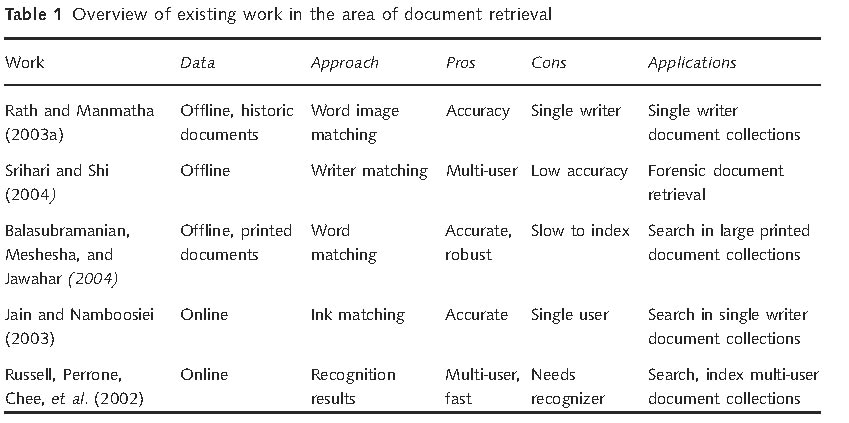 |
|
|
A digital library is a library in which resources are available in digital format, accessible through computers. The digital content may be locally held or accessed remotely via computer networks. There are numerous advantages of digital libraries (Lesk 1997). The user of a digital library need not to go to the library physically; people from all over the world can access the same information, as long as the Internet connections are available. Also, people can access to the information at any time, night or day, and the same resources can be used at the same time by a number of users. Multiple copies of the resources can be made without degradation in quality. Traditional libraries are limited by storage space, while the digital libraries have the potential to store much more information, because digital information requires very little physical space. When a library has no space for extension, digitization is the only solution. Digital libraries provide access to much richer content in a more structured manner, that is, we can easily move from the catalogue to the particular book then to a particular chapter, and so on. The user is able to use any search term up to the word or phrase in the entire collection. The digital libraries can provide very user-friendly interfaces, giving quick access to its resources. These libraries need to support various types of searches. This includes search at the metadata level. Basic metadata search can be limited to the title of the resource, the description, the assigned subject categories, or related URLs. Advanced search offers multiple options including boolean searches, ability to turn stemming off, and limits to category of a record. The digital libraries contain huge wealth of multimedia data, like the video, audio, digital photographs, scanned document images, and other multimedia data. But the multimedia data that is available cannot be searched at the content level. If one were to provide additional information, such as the meta information about them, then one can retrieve the documents that are indexed by the keywords based on the metadata. For example, the metadata for a scanned book are its genre, author, title, ISBN, and the relevant information. Meta data associated with the item is often manually entered. In special situations, meta data gets generated automatically. Metadata based search is the most popular form of searching. However, many users prefer to search at the content level rather than at metadata level. Search engines like Google are widely used for searching the Web pages based on content. Content-level search is more powerful and useful. However, it is difficult to obtain in many situations, especially in presence of images. |
|
|
A PDF file encapsulates a complete description of the document, which includes the text, fonts, images, and 2D vector graphics. Importantly, PDF do not encode information specific to software, hardware, or operating system. This feature ensures that a valid PDF will render exactly the same, regardless of its origin or destination. A PDF document is a data structure essentially made of objects. A content stream is a PDF stream object whose data consists of sequence of instructions describing the graphical elements to be painted on a page. Each page is an object represented by one or more content streams. Content streams are also used to package sequence of instructions as self-contained graphical elements, such as forms, patterns, certain fonts, and annotation appearances. PDF serves purpose for fundamentally two kinds of applications: the producer (PDF generator) and the consumer (PDF reader). Today, we have many open-source PDF viewers available. The popular among them are the Xpdf, Ghostscript, and KPDF for Linux platforms and proprietary viewer such as the Adobe Acrobat for the Windows operating system. Each of these applications implements the textual query search, with additional functionalities such as searching the sequence of pages, specific selected pages, case-sensitive search, and searching as a regular expression, and provides navigating functionalities such as forward and backward search. |
|
Figure 1 shows the entire procedure that a typical PDF reader application undertakes when handling a PDF for viewing and searching purposes. As shown in Figure 1, the PDF structure consists of a one-line header identifying the version of the PDF specification to which the file conforms, a body containing text and graphic stream objects that make up the PDF, a cross-reference table containing references to indirect object, a trailer giving the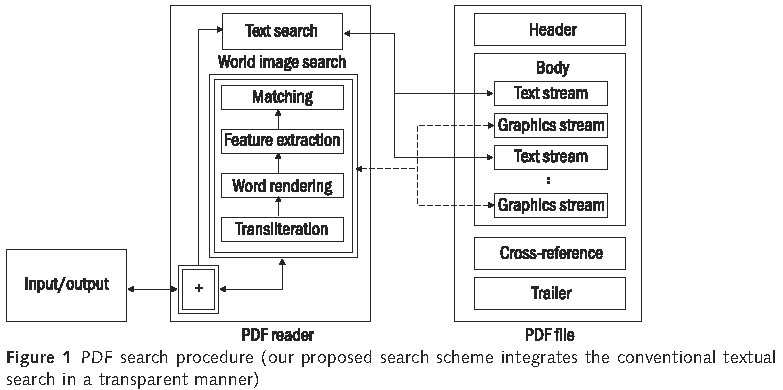 location of the cross-reference table, and certain other special objects. A user typically presents a search string, and the text search module looks into all the text stream objects in a PDF and displays the results to the user. This is how conventional PDF search works. We used an existing PDF reader application and modified it so as to implement the word image search (within double rectangle) that looks into the graphics stream objects in a PDF to match word images. The modules indicated by a double rectangle in Figure 1 are the routines plugged inside a conventional PDF reader application to incorporate word image search. The results from both the search modules are integrated and are presented to the user, making the whole process of searching transparent to the user. |
|
|
Most of the PDF readers/viewers support search (find) of query text. This search mechanism is handled page by page in a PDF file, providing a means for inline searching. Whenever the user searches for a particular word, the word has to be searched in all the available pages of a PDF file. Typically, the search starts from the current page till the last page in the file and then continues from the first page. Every block (text block) in a page is searched in a top-down sequential order. Text from every line in a block is extracted and is then compared with the input search string. The comparison is not straightforward, as the text extracted from these lines are read character by character (including spaces) from a line and then matched with the input search string. Additional information on search is handled appropriately during the search, like ignoring the case while searching. In this case, both the input search string and the text characters in the line are converted to lower case (or upper case) and then compared. Information such as searching forward in a page or backward in page is also explicitly handled by the PDF reader applications. These search operations are PDF reader application dependent, as some of them are capable of handling search at multiple lines and across blocks, while some of them handle only at the line level. Once a match has been found, the search string in the PDF file is shown in reverse video. The display-related functionalities are handled separately and they are dependent on the user coordinates, which typically is dependent on the resolution of the display, the current zoom of the reader application, and other such device-dependent features. |
|
|
We often find PDF files that contain images stored in the graphics stream. Document image contains textual information in the form of an image. Most of these images are scanned copies of technical reports, papers, journals or books. A PDF reader cannot extract text from an image thus, making it impossible to search within document images embedded in the graphics stream. During a typical text search in PDF files, the image area is now ignored as it is not the area of interest, and is handled only during display-related operations. It is sometimes in the interest of the user to search words within an image. One solution to the above problem is to use an OCR (optical character recognizer) to convert the image data into text so that this text is available to the user to search. OCR indeed looks like a veritable solution and some applications (Adobe Acrobat 7.0 Professional) have used such techniques to search text inside images in a PDF file. This solution is better suited for languages that use the Latin script. The fact that we have OCRs for English with high accuracies makes the above approach possible. OCRs for Indian languages and other oriental scripts are not known for high accuracies and this makes the approach less effective for word search in PDF files that contain images in Indian or oriental languages. Also the fact that Indian language text is nonstandard (represented in custom fonts) makes even the textual search a difficult problem. We employ a similar idea for searching within the graphics stream of PDF files. This involves the following steps. Extraction of graphic streams Document images are extracted from the graphics stream of a PDF file in its entirety. Word segmentation The pre-processed image is then subjected to word-level segmentation and all the word images in a document image are then extracted. Feature extraction Feature values are extracted from the segmented word images that are used for matching purposes. Matching Word image matching techniques are employed to match word images using their feature values. |
|
| Word images are matched at their feature level. Feature extraction is one of the most important tasks after a word image has been segmented and extracted from a document image. Generic content-based image retrieval systems use colour, shape and/or texture features for characterizing the content. In the case of document images, features can be more specific to the domain as they contain image description of the textual content in it. The features include profile features such as upper and lower word profiles and projection profiles. Furthermore, structural features such as normalized moments, first order moments, and statistical moments such as the mean, standard deviation, and skew are used. Word image features include the transform domain representations like Fourier coefficients. Feature values are normalized such that the word representations become insensitive to variations in size and font and various degradations commonly present in the text documents. |
|
|
DTW is used to compute a distance between two time series. A time series is a list of samples taken from a signal, determined by the time the respective samples were obtained. A naive approach to calculating a matching distance between two time series could be to resample one of them and then compare the series sample-by-sample. The drawback of this method is that it does not produce intuitive results, as it compares samples that might not correspond well. Dynamic time warping solves this discrepancy between intuition and calculated matching distance by recovering optimal alignments between sample points in the two time series. The alignment is optimal in the sense that it minimizes a cumulative distance measure consisting of ?local? distances between aligned samples. The procedure is called time warping because it warps the time axes of the two time series in such a way that corresponding samples appear at the same location on a common time axis. DTW has been widely used in speech processing, bioinformatics, and also in the online handwriting communities to match the 1D signal. The matching of two words based on the features is carried out using a dynamic time warping algorithm. Let the word images (say their profiles) be represented as a sequence of vectors F = F1, F2, ? FM and G = G1, G2,???.GN. The DTW-cost between these two sequences is D(M, N), which is calculated using dynamic programming, which is given by: 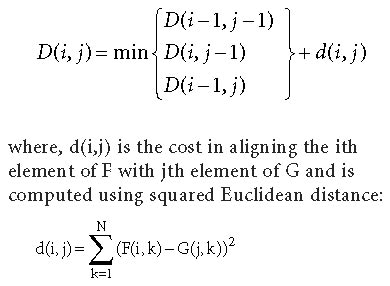 Using the given three values D(i, j ? 1), D(i ? 1,j) and D(i ? 1, j ? 1) in the calculation of D(i, j) realizes a local continuity constraint, which ensures that no samples are left out during time warping. A global constraint using Sakoe?Chiba band (Sakoe and Chiba, 1980) is imposed so as to ensure the maximum steepness or flatness of the DTW path. Score for matching the two sequences F and G is considered as D(M,N), where M and N are the lengths of the respective sequences.A sample plot of matching profiles of two word images, ?gardener? and ?garden?, is shown in Figure 2. It can be seen that the last few characters of ?gardener? are not really contributing to the dissimilarity computation as trailing sequence of characters do not have matches. Also, note that the starting letters, ?g? and ?G?, at the image level are different. It can be observed that for word variants, the DTW path deviates from the diagonal line either in the horizontal or in the vertical direction from the beginning or end of the path, which tremendously increases the matching cost. After carrying out the matching process using the DTW, the path is backtracked so as to get the minimum distance traversed. Figure 2 shows the upper profile feature values for the above-mentioned sample words. |
|
The graphics stream of a PDF file has been conventionally used only for viewing purposes and thus making it inaccessible to search. We.jpg) have used the existing text search framework in PDF files to locate and then search graphic stream objects (Figure 1). The entire process of locating the graphics stream objects in a PDF file and then searching and matching is now explained. As can be seen from Figure 3, there are two stages: the PDF file load stage and immediately after loading, the search stage, separated by the horizontal dashed lines at the middle. During the load stage, a PDF file is read normally. All images in the PDF file are then extracted in the Read PDF file module. In this routine, we extract all images in their entirety (full size), and some additional information such as their width, height, location in the page of a PDF document, and page number are extracted and stored in a separate data structure. Since every image in a PDF file need not be a document image, the extract document image module determines whether the current image is a document image or not. If the current image is not a document image, then it is ignored while document images are subjected to further processing. The extracted document image then goes through the pre-processing module that does various preprocessing operations like skew-correction, thresholding, and binarization. This pre-processed image is then sent to the word segmentation module that segments the pre-processed image into word images. These word images are then sent to the Feature Extraction routine that extracts feature values from the word images. We have used features (Jawahar, Mesha, and Balasubramanian 2004) such as the horizontal profile, the vertical profile, and the background to ink transition. All these features are normalized so that variations due to font size are taken into account. This process is repeated for all the document images in the PDF file. This entire offline process should not interfere with the PDF readers loading and displaying contents of a PDF file, which is very fast. Keeping this in mind, we fork out the entire offline activity in order to facilitate the user to query the text content until the features are extracted for all the document images in a PDF file. During the search phase, the input text is processed along with the language information. There are two kinds of input, the ASCII and the ITRANS (ITRANS 2001). In the ASCII mode, the English text is handled (Latin scripts) as it is. 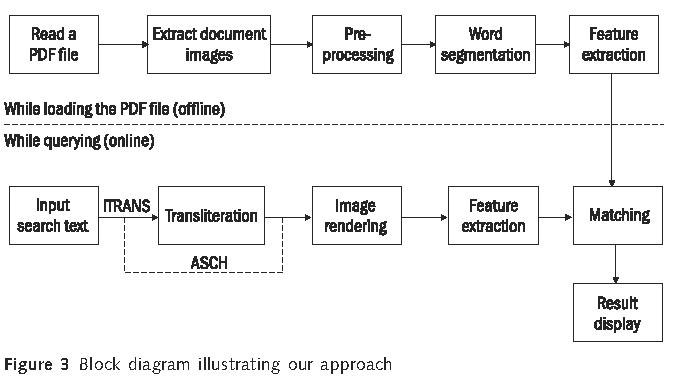 While in the ITRANS input mode, the user chooses a target Indian language in which he/she has to search. ITRANS is a transliteration scheme wherein the user types input search text in Roman characters while the output is in the particular Indian language. After determining the input mode (ASCII or ITRANS) and language, the input text is rendered as a word image. This word image is then subjected to feature extraction process. In the Matching stage, the features of the rendered input word image are matched with all the features of the word images that were extracted during the load process. We use the DTW (Rath and Manmatha 2003b) based matching technique to match the input word image with every other word image in the PDF file. Partial matching (Jawahar, Mesha, and, Balasubramanian 2004) is accommodated so that word form variations are also searched and taken care of. The resultant matches are restricted according to a threshold and the matched word images are grouped according to their page numbers. The display is also in reverse video, with appropriate conversion from the image coordinate space to the display coordinate space. The load process is initiated every time a user opens a new PDF file or updates the PDF document. This search is integrated within the text search (Figure 1), so that the search result is transparent to the user irrespective of whether the search result was from a Text stream or Image stream. |
|
|
We verified our algorithm on an open-source PDF reader (Xpdf) (XPDF 2005). Implementation integrates the textual and image (graphics) search in a transparent manner. Xpdf is designed to be small and efficient. The Xpdf source code implementation clearly separates out the front-end (User Interface) from its core which is the back-end. This independence of the User Interface from the core is of major advantage to users who are interested to extract text and images from a PDF file without having to view it. The User Interface has been developed using Motif, an X Windows based user interface builder in Linux, while the core implementations concerning the PDF file has been implemented using C++. All the above operations are achieved using Xpdf by appropriately adding and modifying code snippets into the Xpdf source code. The textual search operations are handled well within the Xpdf code, while our module of word image search is integrated within the text search module of the Xpdf source code. Integration process is explained in Figure 1. Indian language scripts have complex layout. Indian language content is often stored as images (graphics) in the PDF files. To search we need an input mechanism that is compatible with the Roman script. To enter an Indian language text as UNICODE, ISCII or font is a cumbersome process. The number of alphabets for Indian languages is typically high when compared to English. The presence of Samyuktakshar (compounded letter) in Indian languages makes the rendering process of the word images all the more difficult. It is very difficult to enter a search string for Indian languages following a specific font encoding for that particular language. This makes it contingent for the user to be wellversed with font encoding for every Indian language. This process is not intuitive and ITRANS (ITRANS 2001) fits in as a perfect workaround. ITRANS is a transliteration scheme wherein the user enters the text in Roman such that the scheme is common across Indian languages. ITRANS text is then converted to UNICODE, and compatible fonts are used to render word images for the UNICODE text. Though there have been attempts for Indian language keyboard layout, known as INSCRIPT, its support at the 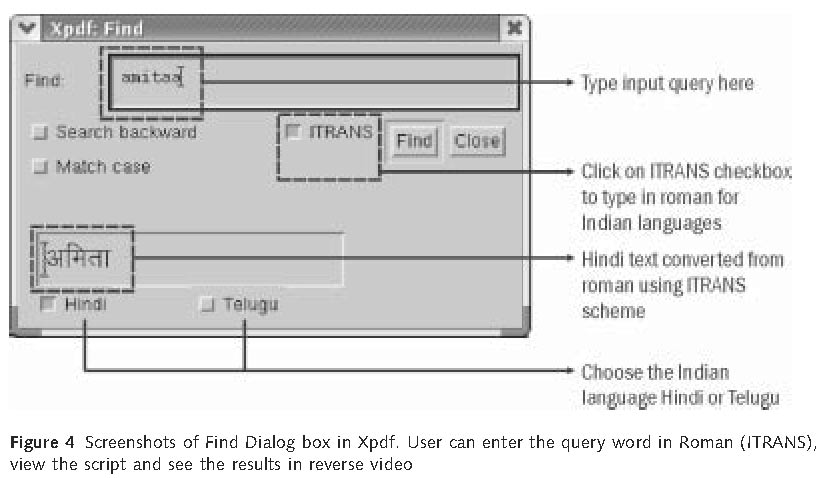 operating system level is not completely satisfactory. One also needs mapping information to convert the ITRANS text to UNICODE of a specific language. Word image rendering is handled by an image rendering routine, which takes a font-encoded text, its font name, its size, and its colour as input and then renders the word image. Figure 4 shows the Find Dialog box in Xpdf, which has been modified to show Indian .jpg) language content depending on the language chosen (for example, Hindi or Telugu). The user chooses the ITRANS check box in the Find dialog in order to search Indian language content. As the user keeps typing in the search Text Box, the corresponding text in the chosen Indian language (Hindi in the above example) will appear. As can be seen from Figure 4, the example shows the search word amitaa that was queried. Figure 5 (a) shows the results highlighted in the reverse video. One has to take note of the fact that the content displayed in the PDF is a document image, but not a textual (ASCII) content. The modified Xpdf code also contains facility to search in Telugu document images (Figure 5(b)) other than Hindi. All that the user has to do is to select the Telugu check box in order to search Telugu PDF files. The converters have to be written from ITRANS to a specific font. The same interface is used to search both inline text and word images. Essentially all the available and existing functionalities of Xpdf are preserved. |
|
|
Here we have presented a word spotting based PDF search for document word images using an existing open-source PDF viewer, Xpdf. We have effectively handled the issues arising out of Indian languages and have supported major functionalities well within the existing source code of Xpdf and have demonstrated it for PDF files containing Hindi and Telugu document images. This solution can help the readers of digital library by giving access to the textual content stored in the graphics stream. |
|
| We thank the Ministry of Information and Technology, Government of India, for their support in this initiative. |
|
|
Adobe Systems Inc. 2003 PDF Reference, 4th edn Details available at http://partners.adobe.com/public/developer/pdf/index_reference.html Ambati V, Balakrishnan N, Reddy R, Lakshmi H, Jawahar C V. 2006 The Digital Library of India Project: Process, Policies and Architecture In Proceedings of the International Conference on Digital Libraries (ICDL.06) Balasubramanian A, Meshesha M, and Jawahar C V. 2004 Retrieval from document image collections In Proceedings of Seventh IAPR Workshop on Document Analysis Systems, 2006 (LNCS 3872), pp. 1?12 New Zealand: Nelson Balasubramanian A and Jawahar C V. 2006 Textual search in graphics stream of PDF In Proceedings of the International Conference on Digital Libraries (ICDL?06), New Delhi, India Chaudhury S, Sethi G, Vyas A, Harit G. 2003 Devising interactive access techniques for Indian language document images In Proceedings of International Conference on Document Analysis and Recognition, pp. 885?889 Doermann D. 1998 The indexing and retrieval of document images: a survey Computer Vision and Image Understanding CVIU 70(3): 287?298 ITRANS. 2005 ITRANS ? Indian Language Transliteration Package Details available at Jain A K and Namboodiri A M. 2003 Indexing and retrieval of on-line handwritten documents In Proceedings of the International Conference on Document Analysis and Recognition, Edinburgh, Scotland, pp. 655?659 Jawahar C V, Mesha M, and Balasubramanian A. 2004 Searching in document images In Proceedings of the Indian Conference on Vision, Graphics and Image Processing, pp. 622?627 Lesk M. 1997 Practical Digital Libraries Books, Bytes, and Bucks. Morgan Kaufmann Lu Y, Zhang L, and Tan C L. 2004 A search engine for imaged documents in PDF files In Proceedings of the International ACM SIGIR conference on Research and development in information retrieval Rath T and Manmatha R. 2003a Features for word spotting in historical manuscripts In International Conference on Document Analysis and Recognition, pp. 218?222 Rath T and Manmatha R. 2003b Word image matching using dynamic time warping In Proceedings of the Conference on Computer Vision and Pattern Recognition (CVPR), pp. 521?527 Rath T, Manmatha R, and Lavrenko V. 2004 A search engine for historical manuscript images In Proceedings of the 27th annual international ACM SIGIR conference on Research and development in information retrieval, pp. 369?376 Russell G, Perrone M, Chee Y M, Ziq A. 2002 Handwritten document retrieval In the Proceedings of the International Workshop on Frontiers in Handwriting Recognition, Korea, pp. 233?238 Sakoe H and Chiba S. 1980 Dynamic programming optimization for spoken word recognition IEEE Trans. on Acoustics, Speech and Signal Processing 26: pp. 623?625 Sankar P K, Ambati V, Hari L, and Jawahar C V. 2006 Digitizing a million books challenges for document analysis In Proceedings of Seventh IAPR Workshop on Document Analysis Systems, 2006 (LNCS 3872), pp. 425?436 New Zealand: Nelson Srihari S N and Shi Z. 2004 Forensic handwritten document retrieval system In Proceedings of the International Workshop on Document Image Analysis for Digital Libraries, Palo Alto, CA, pp. 188?192 XPDF. 2005 XPDF-an open source PDF viewer Details available at(http://www.foolabs.com/xpdf/) |